> ## Documentation Index
> Fetch the complete documentation index at: https://docs.daven.ai/llms.txt
> Use this file to discover all available pages before exploring further.
# Quickstart
> MCP key, build, deploy, and Playground submit
Get an MCP key, build and deploy an education app, then submit it in Playground.
```mermaid theme={null}
flowchart LR
A[Sign in] --> B[MCP key]
B --> C[Build]
C --> D[Deploy]
D --> E[Playground submit]
```
## Before you begin
| Prerequisite | Notes |
| --------------------- | ------------------------------------------------------------ |
| Daven account | Sign in at [daven.ai](https://daven.ai) |
| Token balance | Dev and Playground usage bill **your account tokens** |
| Hosting | e.g. [Vercel](https://vercel.com) (HTTPS URL) |
| MCP client (optional) | Connect `@davenai/mcp` in the AI coding tool you already use |
## Concepts
| Term | Meaning |
| ------------------- | ---------------------------------------------------------------------------------------------------------------------------- |
| Education app | Web app for lessons. Internally also called an MCP app. |
| MCP key | Developer secret `dvn_mcp_live_…`. Used for your MCP client, server-side calls, and Playground. Never put it in the browser. |
| Playground | [daven.ai/playground](https://daven.ai/playground) — verify your app and submit it to Daven |
| Classroom Hub (Edu) | [edu.daven.ai](https://edu.daven.ai) — where approved apps are used in class |
| `@davenai/mcp` | MCP server so your AI coding tool can call Daven while you build |
You do not install MCP on Vercel. Deploy the education app on Vercel and keep the MCP key in **server** env vars. Connect the MCP server in the AI coding platform you use.
## 1. Account and MCP key
Log in at [daven.ai](https://daven.ai).
Open Daven AI **[Settings > MCP Keys](https://daven.ai/settings?tabs=mcp)** and generate a key.
* Format: `dvn_mcp_live_…` (full value shown once)
* Up to 5 active keys per account
* Env var name: `DAVEN_API_KEY`
Store it securely. Do not commit it, put it in frontend env (`VITE_*`), or ship it in the client bundle.
In [ChatGPT / Codex Desktop](https://chatgpt.com/codex), open **Settings → MCP servers → Add server** and connect `@davenai/mcp`. Use **Type: STDIO**.
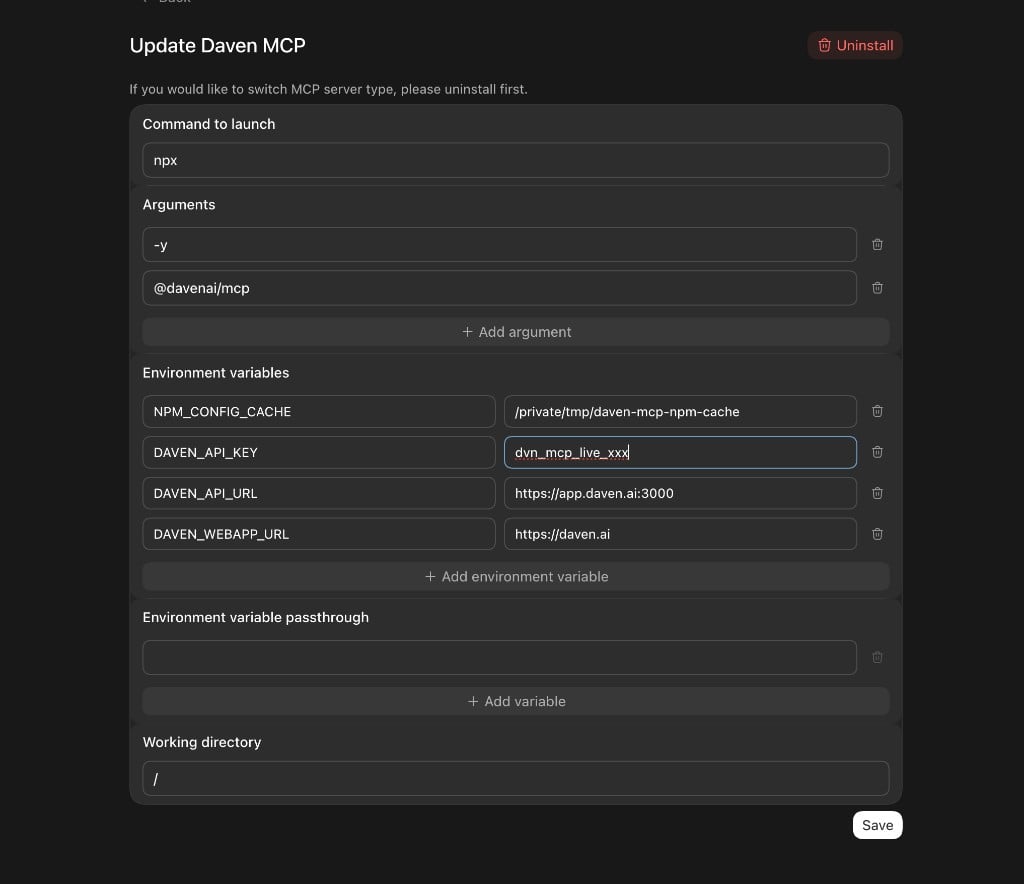 | Field | Value |
| --------------------- | -------------------------------------------------------------------------------------------------------------------------- |
| Type | **STDIO** |
| Name | `daven` |
| Command to launch | `npx` |
| Arguments | `-y` , `@davenai/mcp` |
| Environment variables | `DAVEN_API_KEY` = your key
| Field | Value |
| --------------------- | -------------------------------------------------------------------------------------------------------------------------- |
| Type | **STDIO** |
| Name | `daven` |
| Command to launch | `npx` |
| Arguments | `-y` , `@davenai/mcp` |
| Environment variables | `DAVEN_API_KEY` = your key
`DAVEN_API_URL` = `https://app.daven.ai:3000`
`DAVEN_WEBAPP_URL` = `https://daven.ai` |
| Working directory | `/` |
Save, then restart MCP. Once connected, the agent can use account, quote, and media tools while you build. Follow `daven_guidelines` for app-writing rules.
## 2. Build the education app
**Browser → server API → Daven**. Keep the key on the server (or Vercel serverless) only.
Local lab / reference: `dv_mcp` (`starter/`, `apps/sihwa_project`). → [Reference app](/en/edu/reference-app)
```bash theme={null}
cd dv_mcp
cp .env.example .env # DAVEN_API_KEY, DAVEN_WEBAPP_URL, DAVEN_API_URL
npm install
npm run starter
```
Design the UI and lesson flow as you like.
## 3. Deploy
Playground submit needs a **public HTTPS URL**.
1. Connect the project on Vercel (Root Directory e.g. `apps/sihwa_project`).
2. Set **server-only** env vars (no `VITE_` prefix):
| Variable | Example |
| ------------------ | --------------------------- |
| `DAVEN_API_KEY` | `dvn_mcp_live_…` |
| `DAVEN_WEBAPP_URL` | `https://daven.ai` |
| `DAVEN_API_URL` | `https://app.daven.ai:3000` |
3. Confirm the app works on the deploy URL.
Reference: `dv_mcp/apps/sihwa_project/DEPLOY.md`
## 4. Verify and submit in Playground
1. Open [daven.ai/playground](https://daven.ai/playground).
2. Paste the app URL — local or Vercel Preview/Production.
3. Pass the checklist with your MCP key.
4. **Submit to Daven**.
That is the end of the developer workflow. Review and classroom rollout are handled by Daven.
Playground AI usage bills **your developer tokens**. In class, **classroom credits** are used.
## Done when
| Stage | Pass criteria |
| ------ | -------------------------------------------------------------- |
| Key | Issued in **Settings > MCP Keys**; never exposed to the client |
| App | Daven calls succeed via the server path |
| Deploy | Works on HTTPS |
| Submit | Playground checklist passed + Submit |
## Next
* [Checklist](/en/edu/checklist)
* [Reference app](/en/edu/reference-app)