Skip to main content🎬 Daven AI – Cine Master Shot usage guide
You can find the app here. https://daven.ai/apps
🎥 Cine Master Shot is a high-performance image generation and editing tool that precisely controls real film equipment (camera, lenses), lighting, and exposure to produce a single professional-grade cinematic image.
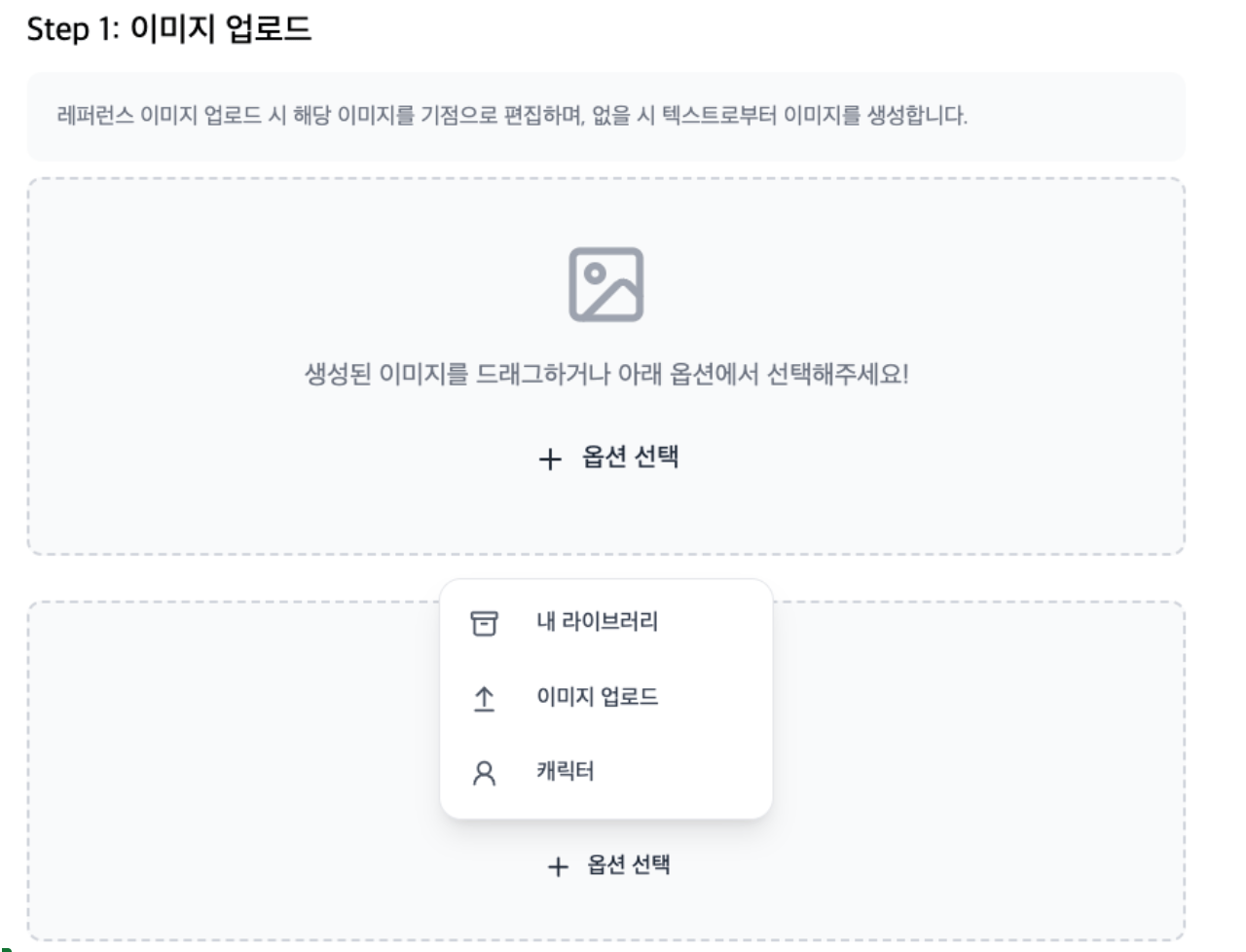
Step 1: Upload image
* Use a reference image: Upload the image that will be the basis for editing. If you don’t have one, a new image is generated from your text.
* Upload method: You can add up to 10 reference images by dragging generated images or using the \[+ Select option\] button.
Step 2: Cinematography (Camera and lens settings)
Choose the characteristics of professional film equipment to define the look and composition of the image.
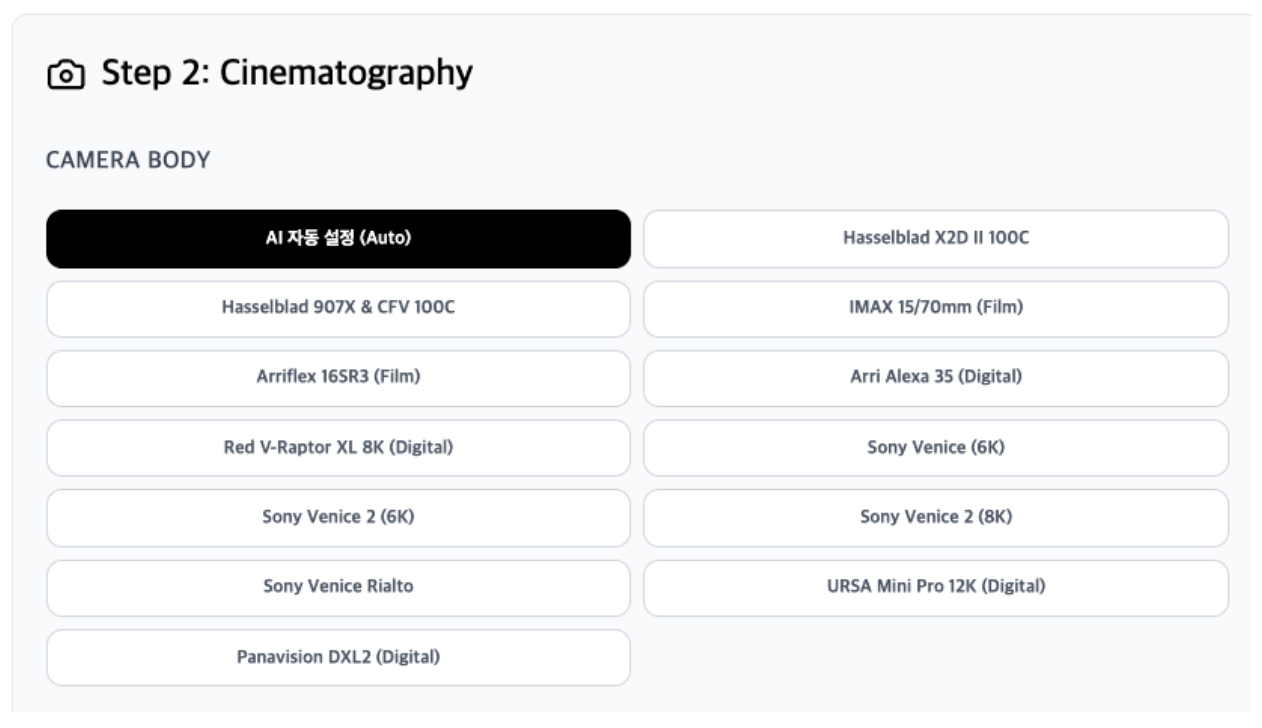
* CAMERA BODY: You can select high-end camera bodies used in real film production, such as Hasselblad X2D, IMAX 70mm, Arri Alexa 35, Sony Venice 2. (Use AI auto if unsure.)
| No. | Camera model | Key traits | Best for (recommended cases) | Example shot |
| :---- | :---- | :---- | :---- | :---- |
| 01 | AI auto | AI-optimized algorithm | Clean results without complex setup | Daily vlog, café scene |
| 02 | Hasselblad X2D II | 100MP, extreme sharpness | Fashion shoots, maximum detail | Model pores, eye catchlights |
| 03 | Hasselblad 907X | Classic look, rich color | Antique spaces, static art film | Elder in an old study |
| 04 | IMAX 15/70mm | Massive resolution, scale | Blockbusters, nature, spacecraft | Epic mountain peak shot |
| 05 | Arriflex 16SR3 | 16mm film grain | Perfume, flashback, documentary | Kids in a ’90s alley |
| 06 | Arri Alexa 35 | Natural skin tones | Cinematic standard, safe choice | Protagonist on a rainy street |
| 07 | Red V-Raptor XL | Strong contrast, modern 8K | Action, sci-fi, sleek ads | Cyberpunk city chase |
| 08~10 | Sony Venice series | Low noise, excellent color | Night scenes, low light | Explorer in a dark cave |
| 11 | Sony Venice Rialto | Detachable sensor, compact | Tight interiors, dynamic close-ups | Fight inside a cockpit |
| 12 | URSA Mini Pro 12K | Ultra-high resolution (12K) | Landscapes, crowds, heavy post | Stadium with thousands |
| 13 | Panavision DXL2 | Hollywood legend color | Soft, epic blockbuster feel | Army advancing at sunset |
🔍 Cine Master Shot: Main optical lenses guide
* Zeiss Ultra Prime: Peak German optics; very sharp and cool. Low distortion, ideal for modern architecture and clean city backgrounds.
* Example: “Businessman with a cold expression in a city full of glass buildings.”
* Cooke S4/i: The legendary “Cooke Look.” Warm, soft skin rendering; beloved for character-driven drama.
* Example: “Family smiling in a living room lit by warm sunlight.”
* Panavision C-Series: Iconic anamorphic Hollywood lenses. Oval bokeh and horizontal blue flare.
* Example: “Action movie scene with car headlights stretching horizontally at night.”
* Canon K-35: Vintage 70s–80s feel. Soft light bloom and dreamy mood.
* Example: “Lovers dancing in a hazy sunset meadow.”
* Helios 44-2 / Petzval 85mm: Swirling “vortex” bokeh. For highly artistic, distinctive looks.
* Example: “Mystical, dreamy scene of a fairy appearing in a forest.”
🔍 Cine Master Shot: Optical lens reference
| Lens category | Lens model | Main traits and recommended use |
| :---- | :---- | :---- |
| Digital precision | Arri Signature / Zeiss Ultra Prime | Sharp, modern texture, when you need realistic rendering |
| Portrait & drama | Cooke S4/i / Canon K-35 | Soft skin tones, warm feel, character monologues |
| Cinematic anamorphic | Panavision C-Series / Hawk V-Lite | Oval bokeh, cinematic flare, wide scale |
| Artistic & special | Lensbaby / Helios 44-2 / Petzval | Swirl bokeh, intentional distortion, dreamlike mood |
| Hasselblad only | XCD series (90mm V / 38/55mm V etc.) | Maximum resolution when paired with Hasselblad body |
| Special purpose | Laowa Macro | Extreme close-ups of small objects or eyes |
📏 Cine Master Shot: Focal length guide
You can choose from 8mm (ultra-wide) to 200mm (telephoto), or enter a value directly.
| Type | Value | Visual effect (usage) | Example shot |
| :---- | :---- | :---- | :---- |
| AI auto | AUTO | AI analyzes scene and composition for optimal focal length | For new directors or quick drafts |
| Ultra-wide | 8mm | Extremely wide view, distortion for dramatic space | Cathedral interior, vast planet |
| Wide | 18mm | Landscape and people with strong sense of space | Tense room, city establishing shot |
| Standard-wide | 35mm | Slightly wider than human vision, natural storytelling | Street snap, full-body shot |
| Standard | 50mm | Closest to human perspective, honest depiction | Everyday life, dialogue |
| Short tele | 85mm | Portrait standard; soft background (bokeh), clear features | Emotional close-up, interview |
| Telephoto | 200mm | Compress distance, pull subject and background together | Sports expression, sniper POV, paparazzi |
| Custom | Direct input | Fine-tune angle between the above values | When you want 45mm, 135mm, etc. |
💡 Director tip: “Widen the space or narrow the emotion”
* For grandeur of space, choose 18mm or shorter. Background recedes and the subject looks smaller while the world feels huge.
* To focus on character emotion or beauty, choose 85mm or longer. Background blurs and only the person holds the viewer’s attention.
Step 3: Lighting Style
After setting the gear, the most important step is designing the light. The lighting style can make the scene feel like a thriller or a romance.
Choose a lighting preset that defines the mood.
- Natural light: Natural, Golden hour, Blue hour
- Studio: Softbox, Backlight, Cinematic
- Mood & color: Moody, High key / Low key, Amber / Crimson / Emerald, etc.
- Special effects: Volumetric, Black & white
| Lighting style | Traits and emotion | Director’s recommended scene (example) |
| :---- | :---- | :---- |
| Natural | Real-world light, realistic and comfortable | Documentary-style, peaceful afternoon |
| Golden hour | Warm, golden sunset light; romance and nostalgia | Lovers parting or reuniting, beautiful flashback |
| Blue hour | Cold, still blue after sunset or at dawn; solitude | Lonely walk at dawn, cold mystery |
| Backlight | Strong light behind subject; rim or silhouette | Hero’s entrance, mysterious figure |
| Softbox | Soft, even light; minimal shadow, flattering | Beauty close-up, interview |
| Cinematic | Classic film lighting; balanced contrast | Dramatic conflict, general feature look |
| Moody | Dark, heavy; strong shadows for inner psychology | Crime thriller, character in distress |
| High key | Overall bright, minimal shadow, positive energy | Comedy, fairy-tale mood, hopeful morning |
| Low key | Most of frame dark, specific areas lit; tension | Noir, horror moment |
| Volumetric | Light rays in air; mysterious and dimensional | Light through fog in forest, light through church window |
| Color filter (amber/red/etc.) | Tinted light for distinct mise-en-scène (e.g. crimson for intensity) | Cyberpunk (violet), war/anger (red), sci-fi (emerald) |
| Black & white | No color, only contrast and texture; classic and artistic | Classic film homage, philosophical scene |
Step 4: Exposure settings
Adjust brightness and depth of field for the image.
Exposure is not just brightness—it completes the “physical texture” of the image.
-
Aperture: Controls background blur (depth of field).
-
Shutter: Controls motion blur or sharpness.
-
ISO: Sensitivity; fine-tune overall brightness.
_※ Click the _*\[AUTO\]** button next to each setting for AI to compute optimal values.
📸 Cine Master Shot: Exposure settings guide
| Setting | Role (in director terms) | Effect | Example |
| :---- | :---- | :---- | :---- |
| Aperture | “Where the eye focuses” | Low (F1.4~2.8): Soft background, subject stands out High (F8~11): Sharp from subject to background | F1.8: Single tear on protagonist F11: Full detail of a huge wall |
| Shutter | “Movement in time” | Fast (1/1000): Freeze the moment Slow (1/30): Motion blur, dreamy | 1/500: Explosion debris 1/15: Soft blur of dancer under streetlight |
| ISO | “Sensitivity to light” | Low (100~400): Clean, sharp High (1600+): Bright in dark (more noise) | ISO 100: Beach at noon ISO 3200: Dark dungeon |
🛠️ How to use exposure
- \[AUTO\]: If you’re unsure about the exposure triangle, click \[AUTO\] next to each setting. AI balances values for your lighting and lens.
- Cheat sheet preview: Use \[Cheat sheet preview\] (top right) to see how current settings affect the image.
- Sliders: Move sliders to fine-tune brightness and depth of field.
💡 Director tip: Settings by situation
- Emotional portrait: Open aperture to F1.4, ISO 200 for clean image. Background melts away; only the face stands out.
- Fast chase: Set shutter to 1/1000 or faster for sharp action.
- Gritty noir: Raise ISO for grain, or slow shutter for uneasy mood.
🎞️ Cine Master Shot: Final step
Step 5. Output settings & custom prompt
-
Set the “frame” of the scene and give the AI final creative notes.
Aspect ratio: Choose a frame that fits the genre.
16:9 (Landscape): Standard cinematic widescreen; ideal for wide backgrounds or dialogue.
Resolution: Determines sharpness of the result.
1K (HD): Good for quick previews and web sharing.
Custom prompt: Add creative details—costume, action, weather—beyond the technical setup.
-
Director example: “Man in a torn leather jacket,” “Falling snow,” “Strong neon sign light.”
-
Batch number: How many images to generate per click.
-
Generating several at once and picking the best is a common workflow, but it uses more tokens.
“The camera is ready and the light is set. Time to hit Generate.”
Step 6. Generate
When everything is set, click the black \[Generate\] button at the bottom.
📊 Output settings summary
| Item | Options | Recommended use |
| :---- | :---- | :---- |
| Aspect ratio | 16:9 / 1:1 etc. | Cinematic (16:9), SNS/poster (1:1) |
| Resolution | 1K (HD) etc. | Quick preview and digital sharing |
| Custom prompt | Free text | Final creative direction to the AI |
| Batch number | Number | When selecting the best from several variants |